Deployment Architecture
Appsmith can be deployed as a single Docker container with a single volume for storing persistent data. For production environments, Appsmith recommends deploying Appsmith on a Kubernetes platform. This page provides an overview of the deployment architecture for Self-hosted Appsmith, focusing on its key components and their interactions in a Kubernetes-based environment.
Core components
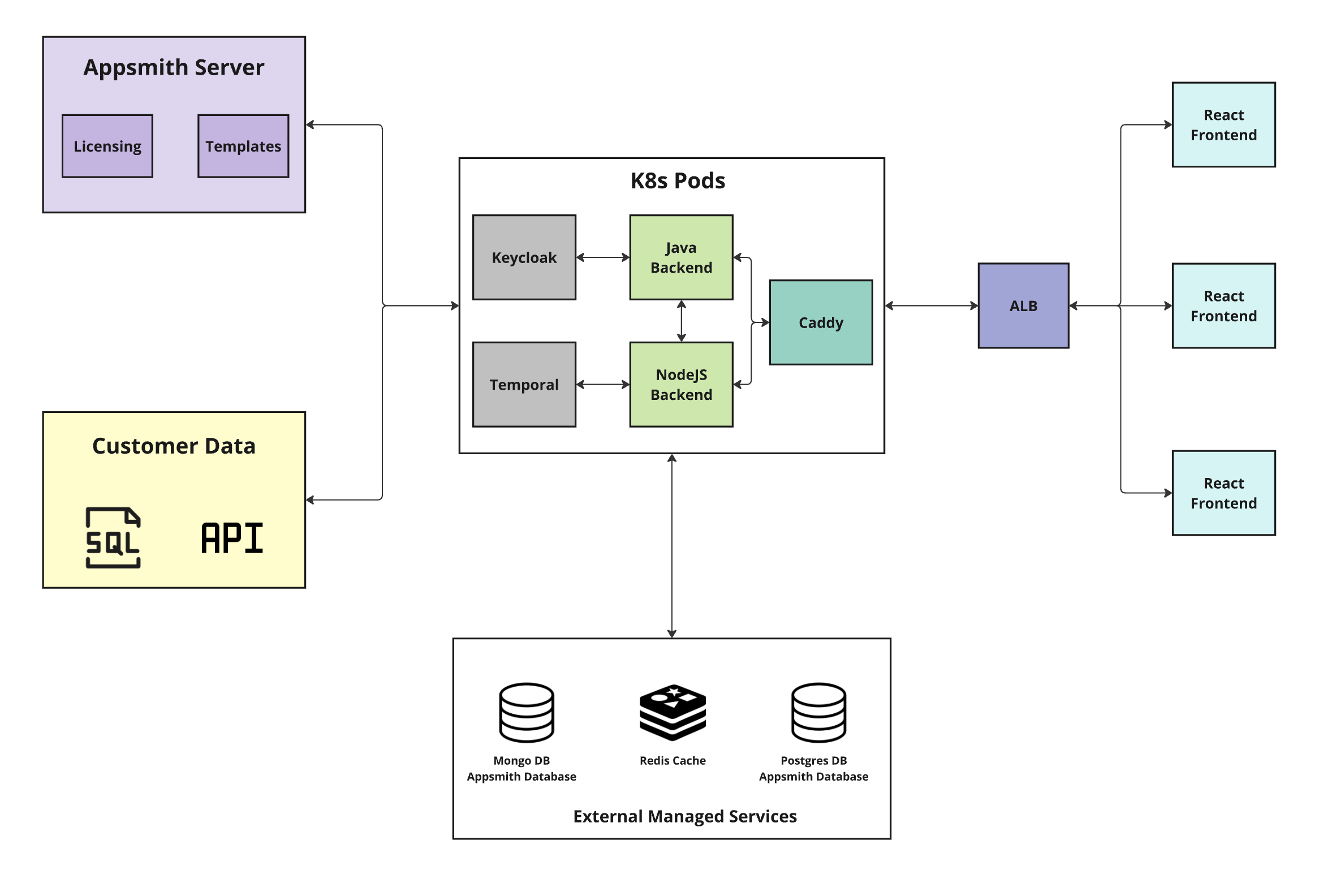
The Appsmith deployment architecture consists of several key components grouped by their purpose and functionality. These include the Appsmith server, customer data sources, Kubernetes pods, external managed services, and frontend architecture. The diagram below illustrates these key components, their interactions, and data flow when Appsmith is deployed on a Kubernetes platform:
Appsmith Server
The Appsmith Server is a cloud service (cs.appsmith.com) managed by Appsmith that serves as the control layer. It's responsible for:
- Licensing: Managing deployment licenses.
- Template configuration: Handles the configuration and management of application templates within Appsmith.
Customer data (external systems)
Customer Data refers to customer's external systems that Appsmith interfaces with, such as:
- SQL Databases: PostgreSQL, MySQL, Microsoft SQL Server, etc.
- APIs: REST APIs, GraphQL endpoints, and other third-party services.
- Cloud Storage Services: AWS S3, DynamoDB, Redshift, and more.
These external datasources allow Appsmith to fetch, process, and visualize data within the platform.
Kubernetes Pods
When deployed on Kubernetes, Appsmith uses different pods, each responsible for a specific service or functionality. These include:
Keycloak
Keycloak manages authentication and authorization for Appsmith using protocols like Security Assertion Markup Language (SAML).
- Keycloak supports Single Sign-On (SSO) using SAML, providing a seamless login experience across multiple services.
- It ensures secure user login and session management by issuing and validating tokens for authentication.
Temporal
Temporal orchestrates distributed workflows and long-running processes in the backend.
- Temporal handles tasks that require persistence, such as handling business logic processes and approval or rejection actions.
- It continuously polls the Temporal cluster to start or resume execution of pending or paused tasks within a workflow.
Java Backend (Appsmith Server)
The Java Backend is the central hub for user interaction, integrating with all components of Appsmith to provide a seamless experience, and handles core business logic within Appsmith.
- Authentication: Manages login credentials, OAuth 2.0 authentication with Google and GitHub, and Single Sign-On (SSO) with OIDC and SAML.
- CRUD API: Provides APIs for managing users, workspaces, applications, pages, and widgets.
- Action Execution: Executes queries on databases and external APIs.
- Git Integration: Maintains clones of Git-connected apps on the file system, ensuring version control and codebase management.
Node.js Backend
The Node.js Backend is a lightweight server that handles several key features to support the Appsmith platform:
- It maps dependencies between APIs, queries, and web UI components.
- It ensures that references for all referencing entities are updated whenever their names change in Appsmith.
Caddy
Caddy acts as a web server and reverse proxy for Appsmith:
- Caddy routes requests to appropriate backend services, whether for static assets (e.g., JavaScript, CSS, images) or dynamic content.
- It handles SSL termination, ensuring secure communication between the user and the backend services.
- For path-unidentified requests, Caddy serves the
index.htmlpage, allowing the React frontend to handle routing in a typical single-page application (SPA) fashion.
External Managed Services
For high availability and scalability, Appsmith configures certain components as external managed services. These services handle persistent storage and caching, ensuring the system remains performant and reliable in demanding environments.
MongoDB Appsmith database
MongoDB serves as the persistent data store for Appsmith, storing all necessary data needed and generated by Appsmith’s building blocks, such as:
- User information and access permissions.
- Applications users are building and have deployed.
- External data sources connected to Appsmith.
- Queries that connect those datasources to the applications.
Redis Cache
Redis serves as a caching layer, improving performance by:
- Caching frequently accessed data.
- Managing user sessions for authentication and authorization processes.
- Reducing database load by storing temporary data, thus enhancing system performance.
PostgresDB Appsmith database
PostgreSQL stores data for Keycloak and Temporal only when those features are in use: Keycloak uses it for user and session data when Single Sign-On (SSO) is configured using SAML; Temporal uses it for workflow metadata and related state when you use Appsmith workflows.
Application Load Balancer (ALB)
The Application Load Balancer (ALB) distributes incoming traffic across multiple frontend instances to ensure:
- High availability and fault tolerance by routing traffic to healthy instances.
- Efficient load distribution to prevent traffic bottlenecks.
React Frontend
The React Frontend is the web client where users interact with Appsmith to design and use internal tools. It:
- Provides the user interface for building, managing, and interacting with applications.
- Communicates with the backend services using REST APIs and WebSocket protocols for real-time interactions.
- Is hosted behind the Application Load Balancer (ALB) to ensure scalable and reliable access to the platform.
Data criticality and backup considerations
Operational criticality helps you plan backups and disaster recovery for self-hosted Appsmith. The subsections below are ordered from highest to lowest typical criticality.
MongoDB (critical)
MongoDB is Appsmith’s primary data store in your deployment. If lost, app, workspace, and configuration state is not practically rebuildable from source.
Use appsmithctl backup to create backups that include the MongoDB database, configuration, and Git data. For steps, see Backup Instance.
EFS and persistent volumes (critical for continuity)
Persistent volumes (for example AWS EFS or other attached storage) hold configuration, keys, Git storage, backups, certificates, and similar artifacts depending on deployment. Some parts are rebuildable; key configuration and persistent artifacts may not be.
appsmithctl backup backs up Appsmith instance data under Appsmith-managed paths on that storage, as described in Backup Instance. You should still protect the underlying volume as part of continuity and disaster recovery.
PostgreSQL for Keycloak and Temporal (important)
PostgreSQL is not Appsmith’s primary application database (MongoDB is). Appsmith uses this PostgreSQL instance when you enable features that rely on it:
- SAML SSO: Keycloak stores authentication and session data in PostgreSQL when you configure SAML-based SSO.
- Temporal workflows: Temporal stores workflow metadata and related state in PostgreSQL when you use Appsmith workflows.
If you use SAML SSO, workflows, or both, losing PostgreSQL is rebuildable in principle but causes user-visible impact (SSO, auth, workflow history, or workflow state disruptions). Plan backups and treat operational criticality for this database only when you enable one or both of those features.
Backups created with appsmithctl do not include this PostgreSQL database. Back it up separately when you use SAML SSO and/or Temporal workflows. For setup details, see External PostgreSQL.
Redis (context-dependent)
Redis is used mainly for caching and session handling and is usually rebuildable after failure. If Redis data is lost, users may be logged out or see other transient effects.
If you use In-Memory Git (Redis-backed) with a dedicated Redis instance, that Redis holds Appsmith Git cache and branch metadata. Losing it can disrupt Git operations until data is repopulated from remote repositories and normal workflows. In that case, treat Redis as operationally important (medium to high criticality).
Summary
Treat MongoDB and EFS or persistent volumes as highest criticality. PostgreSQL is medium to high when you use SAML SSO and/or Temporal workflows (because Keycloak and Temporal persist data there). Redis is lowest when used only for cache and sessions, and medium to high when used for In-Memory Git.
For operational guidance, see Self-hosting Best Practices, including Backup and recovery management.
See also
- Installation Guides: Learn how to install Appsmith on different platforms.
- Install Appsmith on Kubernetes: Learn how to install Appsmith on Kubernetes.